Generate a Fruugo Product Feed From Your Shopify Catalog

AdNabu’s “Custom Feed” feature organizes your Shopify product data around Fruugo’s CSV and XML feed fields, so your catalog is ready before your Fruugo onboarding begins.

Sell on Fruugo to International Shoppers With Your Shopify Inventory

Fruugo’s websites recorded 300 million visits in 2025, according to the company. Because Fruugo translates listings and converts prices for each market, the products in your Shopify store can reach buyers well beyond your home country.
Built For Shopify

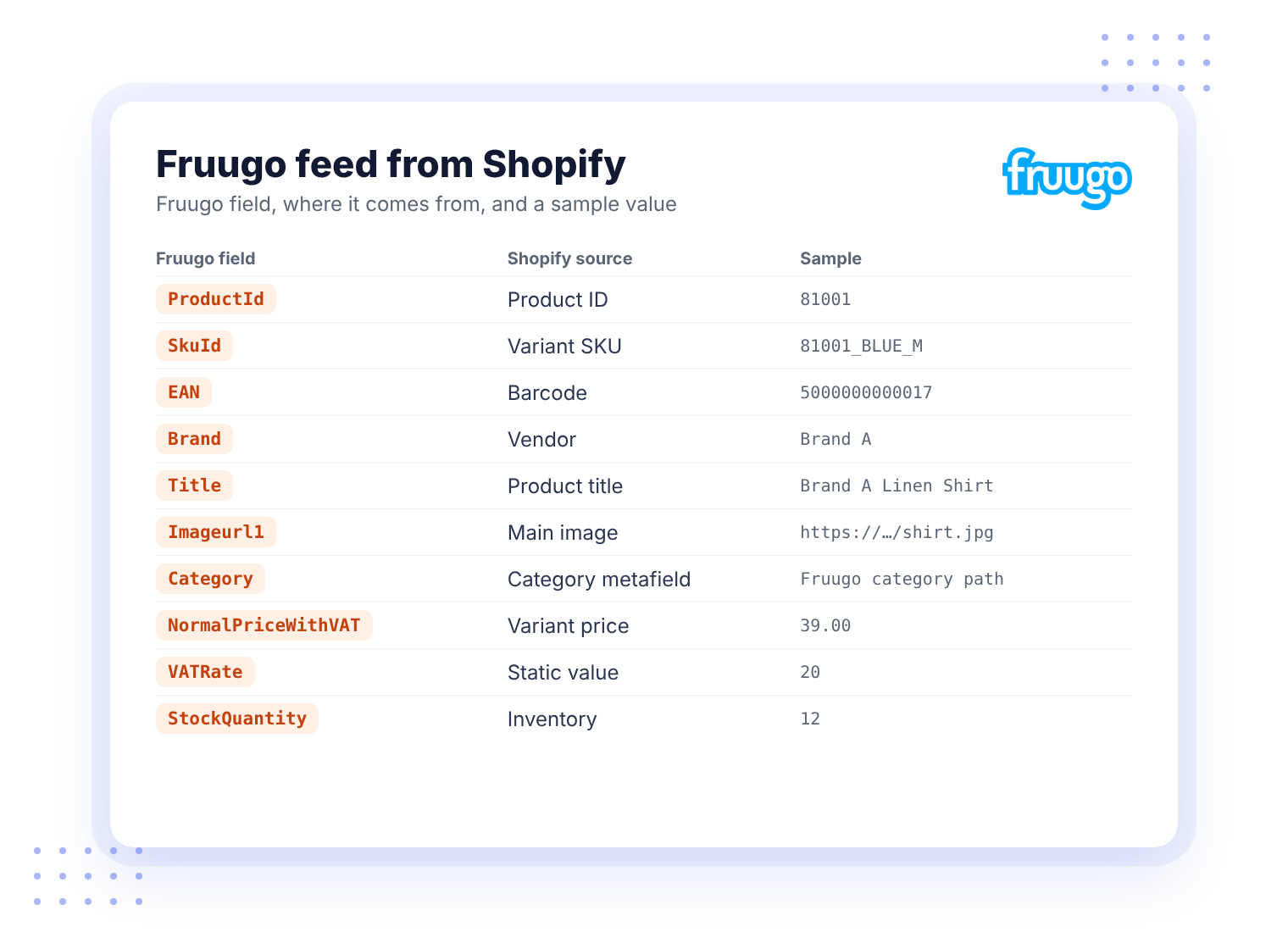
Match Shopify Fields to Fruugo’s Feed Specification

Fruugo lists 11 mandatory fields in its CSV and XML formats, and most of them already exist in your Shopify catalog.

  • Use the Shopify product ID as ProductId and each variant SKU as SkuId, so sizes and colors group under one listing. Fruugo advises against changing or reusing these IDs later.
  • Send your barcode as EAN, and add Brand, Title, Description, and Imageurl1 for a main image on a white background, at least 400 × 400 pixels.
  • Store the full Fruugo category path in a Shopify metafield and map it to Category, since Fruugo relies on it for tax treatment as well as placement.
  • Choose either NormalPriceWithVAT or NormalPriceWithoutVAT with VATRate, and send StockQuantity or a StockStatus such as INSTOCK. Add AttributeSize and AttributeColor for products that come in several options.
Tidy Up Fruugo Titles and Descriptions With AdNabu AI

  • Have AdNabu AI, which runs on the latest GPT models, rewrite titles and descriptions, then map them into your Fruugo feed as AdNabu fields. Fruugo asks for titles in title case without prices, shipping notes, or promotional text, so review the results against those rules.
  • Let Automated AdNabu AI keep refining product data on its own, within your allocated AI credits.
  • Use Google Keyword Planner suggestions to use keywords your shoppers actually use to search for products similar to yours, while keeping descriptions free of URLs, email addresses, and phone numbers, which Fruugo doesn’t permit.
  • Bulk edit titles, descriptions, and product types across your variants, leaving size and color out of titles for grouped products, as Fruugo recommends.
Advertise Globally With Localized Feeds
Advanced Feed Optimization

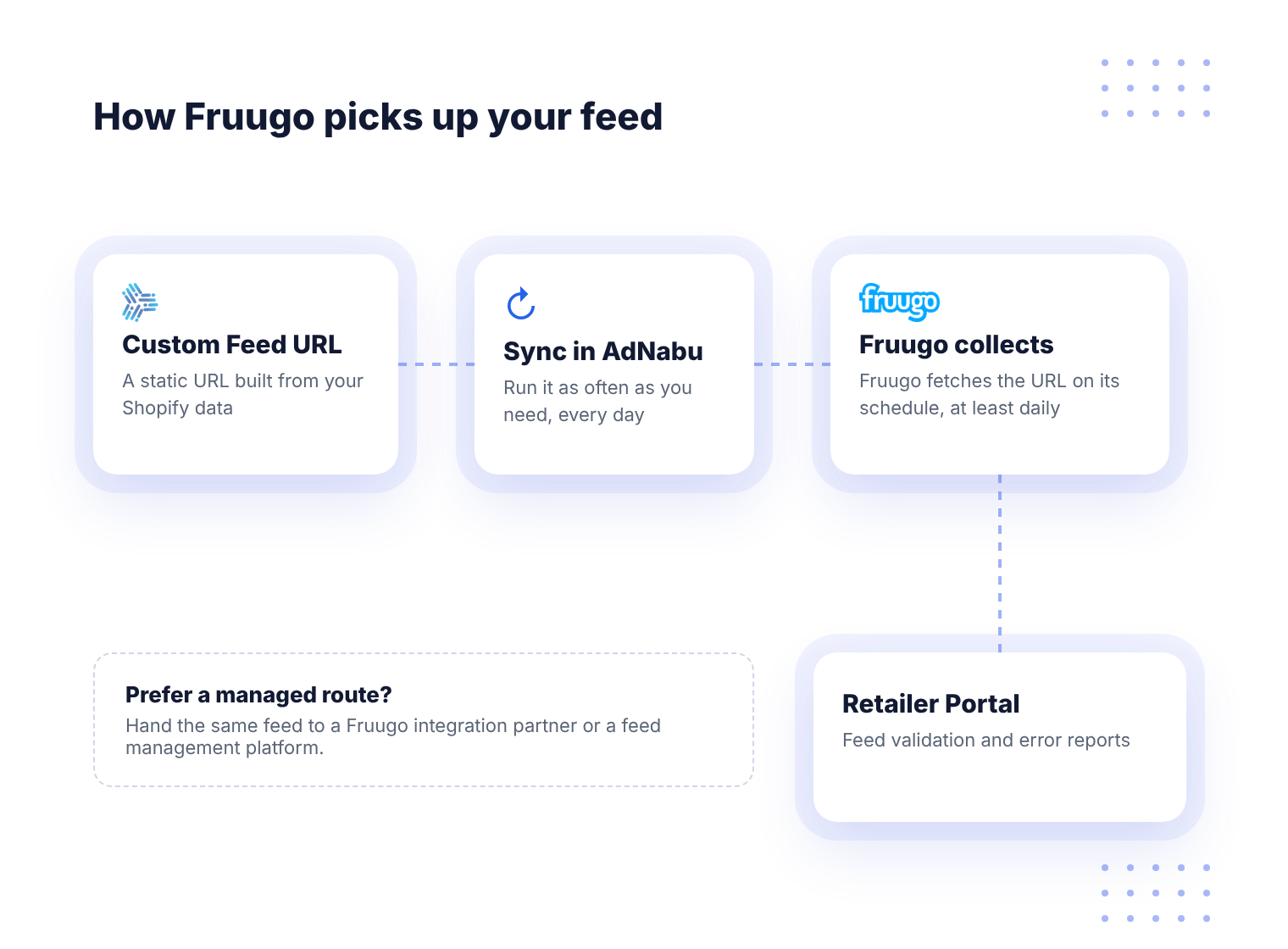
Give Fruugo a Feed URL It Can Collect

Fruugo’s policy is that retailer feeds are generated automatically rather than built by hand, then published to a static URL its system collects on a schedule.

  • Copy your Custom Feed URL from AdNabu and share it with Fruugo’s integration team during onboarding, after checking the output against Fruugo’s CSV or XML specification.
  • Your feed URL stays the same while AdNabu rebuilds the data behind it, and you can sync as many times a day as you need, so Fruugo’s at least daily collection picks up current prices and stock.
  • If you would rather have a partner look after your Fruugo connection, you can also hand the same AdNabu generated feed to one of Fruugo’s integration partners or a feed management platform.
  • Accounts are generally limited to 150,000 SKUs unless Fruugo agrees otherwise, so decide which products to include first if your catalog is larger.

Let Fruugo’s Marketing Put Your Products in Front of Shoppers

  • Fruugo advertises retailers’ products itself, spreading spend across Google, Bing, Facebook, its affiliate network, and local shopping portals.
  • According to Fruugo, most of the commission it charges is spent promoting your products in the Fruugo countries you choose.
  • Raise your commission with the Commission Rate Adjustment Dial in the Retailer Portal when you want more marketing spend behind your products. Increases take effect straight away.
  • Follow results in the Advertising Performance section of your Retailer Dashboard, which compares you with retailers in your peer group. Fruugo runs all of this advertising, separately from AdNabu.
Seamless Shopify-Native Data Support
Up-to-date Feeds for TikTok

Grow on Fruugo, Google Shopping, and 2,000+ Channels in Different Regions With One App

  • Sync your Shopify products to Google Merchant Center for your own Shopping ads and free listings, with your Fruugo feed set up in the same dashboard.
  • Add feeds for European marketplaces such as Zalando, OTTO, and idealo, or for wholesale and niche channels like Faire and Bonanza, each built around its own field rules.
  • Keep identifiers such as SKU and EAN identical across every feed, which makes orders and stock easier to match between channels.
  • Work with an app Shopify has awarded its “Built for Shopify” badge after checking its speed, design, and value to merchants.
HAPPY CUSTOMERS

See why our customers love us.

Stars

Easy to setup!

So far the app has been incredible easy to setup and customer service superb. This will make so much difference to our advertising abroad!

Le Club

Canada
Stars

The Absolute Best!

They went above and beyond to get my product listed and running on Google. I have tried for years and no one could help me, until I got the Adnabu app!

Millevita

Australia
Stars

Great App!

Able to change title listing is a major plus to help with SEO on Google Shopping, much better than the native shopify integration!

United States

Blade-Tech Holsters

Stars

24/7 for support!

What an amazing team of people at this company. It seems as if there are around 24/7 for support! Great app, great support, and great documentation which helps a lot.a placeholder text to demonstrate the visual.

Classic Horror Shop

United States
Stars

Really nice job!

I've been using the app for a while now and I still love its simplicity. Thanks to the app, I was able to get all my products approved. The app saved me a lot of time and, above all, nerves. Really nice job!

RoTe Place

Australia

Frequently Asked Questions

Take Your Shopify Catalog to Fruugo’s Global Shoppers

Install AdNabu, prepare your Fruugo fields, and give buyers in other countries a new route to the products you already sell.